

A flexible freelance job can still leave you checking messages all day. Productive remote freelance work starts with clear commitments, realistic scheduling, and async communication, not constant availability. Agree on deliverables, response windows, and how urgent requests reach you before work begins, and the rest of the week gets much easier to protect.
This guide shows how to plan your week, keep clients informed, manage several projects, and screen new offers without staying online all day.
Last reviewed: November 16, 2026
At a glance
- Plan around deliverables and deadlines, not hours online.
- Agree on response windows with each client, plus one channel for urgent requests.
- Track every commitment in one place.
- Send short written updates covering progress, next steps, and blockers.
Looking for remote freelance work?
Explore remote and freelance opportunities on Joblet. Location eligibility, schedules, and availability requirements vary by listing. Browse remote freelance opportunities
What does async mean in remote freelance work?
Async means work keeps moving without everyone being online at the same time. You agree on when you reply, keep decisions in writing, and share progress on a set schedule, so a client never needs an instant answer to know where things stand.
Async is easy to confuse with other labels you see in listings. They describe different things, and one role can be several at once, so check the real expectations instead of relying on a listing headline.
| Label | What it describes |
|---|---|
| Remote | Where you work |
| Freelance | Your relationship with the client |
| Part-time | How many hours you work |
| Flexible hours | When the work happens |
| Async | How you communicate: without needing to be online at the same moment |
How do you plan a week around outputs, not availability?
Start with the work you have promised, then add everything needed to finish it: research, meetings, revisions, invoicing, and finding your next project. Avoid filling every open hour with production. Leave room for feedback and surprise changes.
Try this planning sequence:
- List concrete outcomes. Replace 'work on website' with 'send homepage draft for review.'
- Break outcomes into actions. Separate gathering info, producing the draft, checking it, and handing it over.
- Reserve focused blocks. Put hard tasks in periods when you usually focus best.
- Group smaller tasks. Give messages, scheduling, and admin their own windows.
- Add review space. Keep time open for revisions before the final deadline.
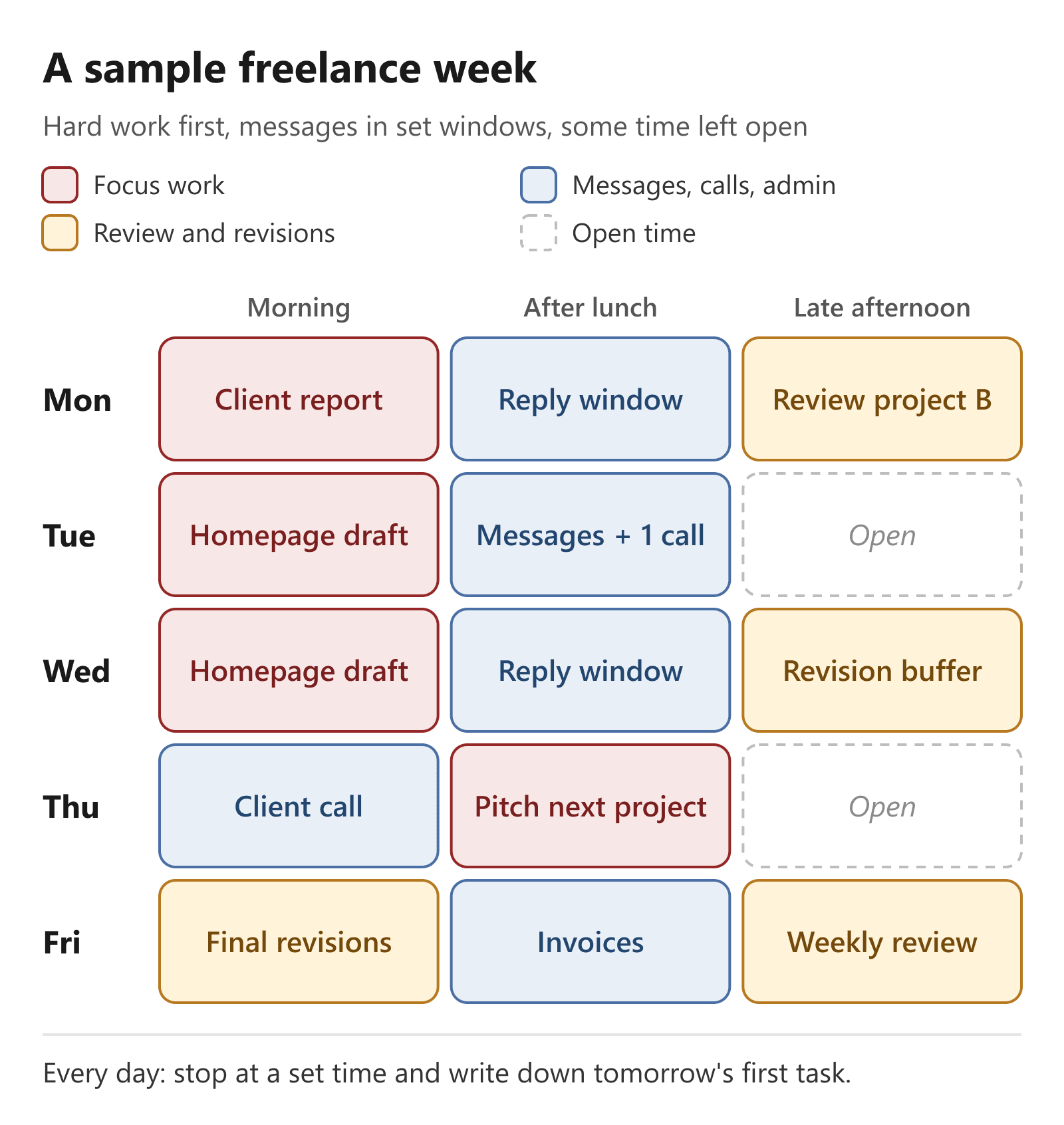
The same sample week as a table you can copy:
| Day | Morning | After lunch | Late afternoon |
|---|---|---|---|
| Mon | Focus: client report | Reply window | Review project B |
| Tue | Focus: homepage draft | Messages and one call | Open |
| Wed | Focus: homepage draft | Reply window | Revision buffer |
| Thu | Client call | Focus: pitch next project | Open |
| Fri | Final revisions | Invoices | Weekly review |
Use it as a test, not a fixed rule. If your home life or energy pattern is different, move the blocks but keep the purpose. When comparing roles with flexible hours, ask whether the flexibility covers production time, meetings, or both, and agree on reply windows so a flexible schedule does not quietly turn into nonstop access.
How do you keep clients updated without staying online all day?
Tell each client when you reply, where requests should go, and what counts as urgent, then send short written updates on a set schedule. Clients stop chasing you when they already know where things stand.
For each client, set where requests arrive, where approvals are stored, and which channel is for urgent issues. Keep decisions with the related task or document rather than spread across private messages. After a call, send a short written recap with decisions, responsibilities, and dates.
An availability message you can copy and adapt:
A useful progress update covers four things: what is done, what comes next, what is blocked, and what you need from the client. 'Draft complete; waiting for product details before final review' is more useful than 'Still working on it.' Send updates on an agreed cadence instead of waiting for someone to chase you.
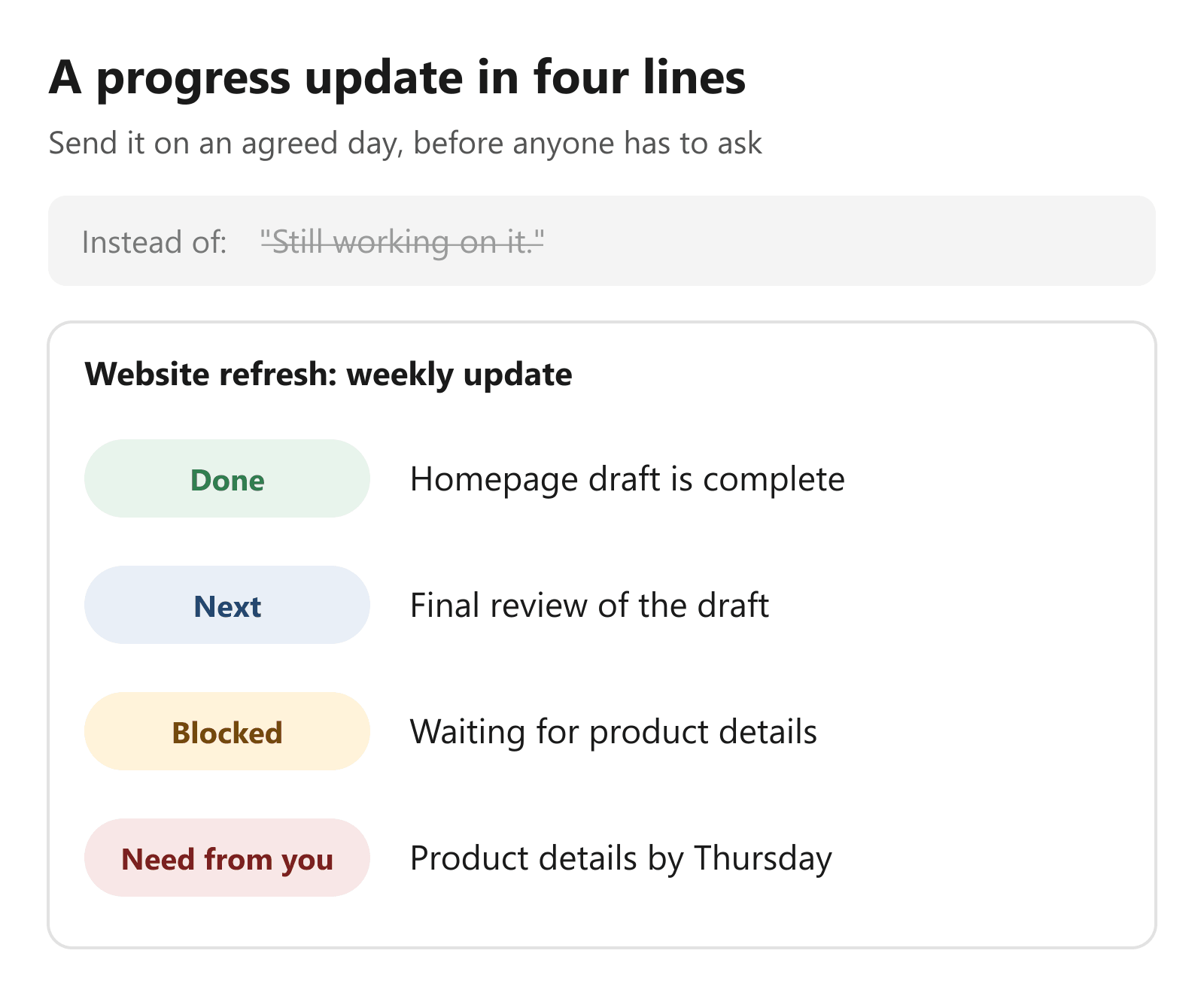
The same update as text you can copy:
Done: Homepage draft is complete.
Next: Final review of the draft.
Blocked: Waiting for product details.
Need from you: Product details by Thursday.
How do you manage several freelance projects without losing focus?
Use one view of every commitment, give each task a clear next step, and check dependencies before you choose what to work on. Prioritize by deadline and impact, not by whichever client wrote last. Keep project files separate, but review your total load in one place.
A simple board can use four stages: ready, in progress, waiting, and complete. Add the deadline, estimated effort, and the person who must act next. Marking a task 'waiting for client approval' makes the blocker clear instead of leaving a half-finished item on your daily list.
Limit how many big tasks you start at once. Before you switch projects, leave a short restart note with what you finished, what remains, and where the files are. That gives your next session a clear start.
Distinguish billing models, too. Hourly work needs an agreement about tracked time and spending limits; fixed-price work needs clear outputs. Some freelance platforms bill hourly contracts from logged time and fund fixed-price milestones before work starts, so check the rules of any service you use rather than assuming protection is automatic.
Which tools do you actually need?
Fewer than you think. Choose tools around the workflow you need, not the number of features they have. Start with a calendar, task tracker, shared file space, and one agreed communication channel. Add another tool only when you can name the problem it solves.
How do you find and screen new remote freelance work?
Search by the service you offer, check each listing's location, hours, and availability rules, and agree on scope in writing before you start. Before applying for remote roles, be clear on which regions you can work from, which hours you can reliably offer, and whether you want repeat work, one-off tasks, or defined projects.
Start with joblet.ai, then company career pages, specialist job boards, and professional groups in your field. Treat every result as a lead to check, not as an offer to trust right away. Narrow searches work better: 'contract bookkeeper remote' beats 'remote online jobs.'
Joby tip: On joblet.ai, you can ask Joby, our job assistant, in plain words. Try "Find me part-time remote bookkeeping roles" and Joby sets the filters and shows matching jobs.
Scope checklist before you say yes
Before accepting a freelance offer, get written answers to anything that affects your workload or pay:
- Scope: What exactly is delivered, and what is not included?
- Deadline: When is it due, and who approves the final version?
- Revisions: How many rounds are included?
- Payment: How much, when, and who approves payment?
- Cancellation: What happens if either side stops the project?
- Ownership: Who owns the finished work?
If a large test is requested, suggest a small paid assignment with a clear result instead of an open-ended exercise.
Warning signs to double-check
None of these is proof on its own, but each is a reason to stop and verify the offer before you go further:
- Paying to get hired: The FTC warns never to pay for the promise of a job.
- A check before any work: The FTC says fake employers send a check, ask you to buy supplies with it, and tell you to send back the rest. When the check turns out to be fake, you are left paying the bank back.
- Crypto to unlock tasks: The FBI warns about work-from-home schemes that ask you to pay in cryptocurrency to unlock work or earn more, while the earnings shown can never be cashed out.
- A text-only interview: The FTC flags employers who only want to interview through Signal or similar text-only apps. Verify the opening with the company directly before sharing anything.
- An unexpected job offer: The FBI warns about unsolicited job offer messages for roles you never applied for.
Before moving ahead, check the recruiter on your own; the FTC suggests searching the name or company with words like 'scam,' 'review,' or 'complaint.'
How do you protect your energy and review what works?
Treat breaks, social contact, and stopping time as part of the plan. Take a walk or lunch away from the desk, and keep regular contact with peers if solo work feels isolating. End the day by writing tomorrow's first action, then close your work channels.
When working from home, prepare your workspace before focused sessions: clear the surface, close unrelated tabs, and check access to important files. Ask clients about their security rules before downloading sensitive material or using unfamiliar networks.
Review your week by completed outcomes, revision time, and unpaid admin, not just hours at the keyboard. Note which assignments stayed within scope and which kept needing extra effort. Use those notes to adjust future estimates, availability, and client talks.
If a week goes badly, change one variable before rebuilding your whole system. Try fewer tasks at once, a clearer brief, or a different meeting window. Keep the change long enough to see whether it helps.
Frequently asked questions
What does async mean in remote freelance work?
Async means work keeps moving without everyone being online at the same time. You agree on reply windows, keep decisions in writing, and send progress updates on a set cadence instead of staying available all day.
How do I set boundaries with freelance clients?
Tell each client when you check messages, how fast you reply, and which channel to use for urgent requests. Put it in writing at the start of the project, and confirm any deadline changes in writing too.
How do I manage several freelance projects at once?
Keep one view of every commitment, give each task a clear next step, and use a simple board with four stages: ready, in progress, waiting, and complete. Leave a short restart note before you switch projects.
What should a freelance progress update include?
Four things: what is done, what comes next, what is blocked, and what you need from the client. Send it on an agreed cadence so the client never has to chase you.
How can I check whether a remote job offer is real?
Search the company or recruiter's name with words like 'scam' or 'complaint,' and verify the opening with the company directly. Be careful with any offer that asks you to pay to get hired, sends a check before you have done any work, or asks for cryptocurrency to unlock tasks.
Make remote freelance work sustainable
Choose suitable commitments, define what done means, and give focused work a protected place in your week. Start with one improvement: clarify a project's scope, merge your task list, or set reply windows. The goal is not to fill every hour. It is to deliver well without making work your permanent default.
Find your next remote freelance project
Explore remote and freelance opportunities on Joblet. Location eligibility, schedules, and availability requirements vary by listing. Browse remote freelance opportunities