
Job search, right inside your Grok chat.
Candidates are not starting on job boards anymore. They are starting in a chat.
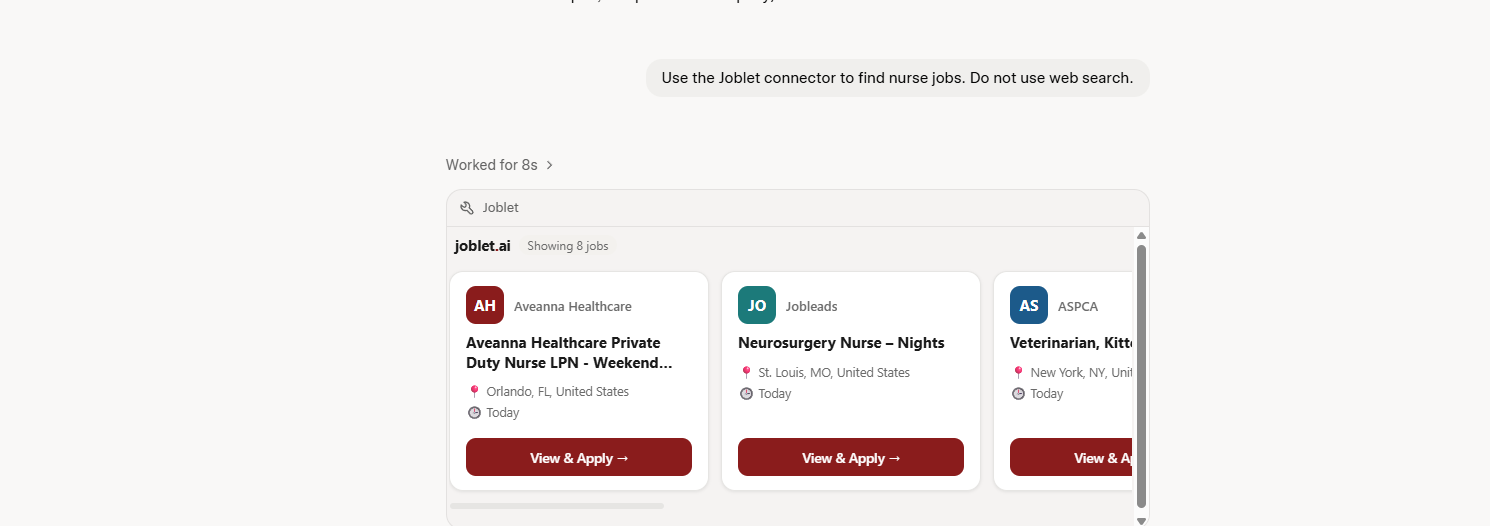
Ask Grok about work and it searches live postings on joblet.ai, then hands back real openings with an interactive job card carousel. Read only, so it looks jobs up and changes nothing.
- Transport
- Streamable HTTP
- Endpoint
- POST /mcp
- Auth
- None required
01What you can ask
Just ask, in your own words.
Press a question to see which tool runs and what comes back.
Find nurse jobs

Showing nurse roles from across the job feed.
- Private Duty Nurse LPN · Aveanna Healthcare
- Neurosurgery Nurse · Jobleads
- Licensed Practical Nurse · CareRite Centers
Rendered as job cards in the chat
02The tools
Two tools, one conversation.
Search live postings
search_jobsSearches joblet.ai by title or keyword, with optional filters, and renders the matches as a job card carousel.
What it accepts
A search term plus optional filters such as location or company. Grok pulls them out of your sentence for you.
No match returns a specific message, for example "No jobs found for ‘X’ in ‘Y’", never a generic error.
What it returns
- id
- Stable identifier, used by get_job_details
- title
- Job title as published
- company
- Hiring company or agency
- location
- City and country, or Remote
- apply_link
- Where the application is completed
They hand off to each other. search_jobs returns results carrying stable ids, and a follow-up question makes Grok call get_job_details with the right one. You never see an id.
03Setup
Connected in under a minute.
No login, no API key, nothing to configure.
Open Connectors in Grok
Go to grok.com/connectors and choose New Connector, then Custom. A Grok paid plan is required to add a custom connector.
Paste the server URL
Paste the Joblet server URL below, name it "Joblet", and leave authentication empty. The connector is read only and needs no key.
Save the connector
Save, and Grok discovers the two Joblet tools automatically. Nothing else to configure.
Start asking about jobs
Ask in plain language, for example "find nurse jobs" or "warehouse roles in Dallas", and Grok reaches for Joblet when it fits the question.
https://joblet-grok.joveo.com/mcpSpecification
Live- Server URL
- https://joblet-grok.joveo.com/mcp
- Transport
- Streamable HTTP
- Endpoint
- POST /mcp
- Access
- Read only
- Authentication
- None required
- Tools
- search_jobs, get_job_details
- Data
- Live job feed
04Limits
What it will not do.
Scope is a feature. These are the edges of v1.1.
Read only
It cannot apply, create an account, or save a job for you.
No sign in
Public listing data only. No account, no API key, nothing to configure.
Live job feed
Listings come from Joblet’s job feed and refresh through the day.
Clear results
You get matching roles with a direct apply link, or an honest no match.
Only your search terms reach the joblet.ai public API. Nothing is stored beyond standard server logs, no conversation content or personal data is collected, and nothing here trains any model, ours or a third party’s.
Privacy policyQuestions
The things people ask first.
Do I need a joblet.ai account?
No. The connector reads public job listing data, so there is nothing to sign in to. You will only need an account if you choose to apply or save a job on joblet.ai itself.
Can Grok apply to jobs for me?
No. The connector is read only. Grok can find a role and hand you the apply link, and you complete the application yourself on the employer’s site.
Do I have to name the tools or use special syntax?
No. Ask in your own words. Grok picks between search_jobs and get_job_details based on the question, including on follow-ups such as "tell me more about the second one".
What happens to my search terms?
They are used to search Joblet’s live job feed and nothing more. Nothing is stored beyond standard server logs, and no conversation content or personal data is collected. The full detail is in the AI Assistant Integrations section of our privacy policy.
Will it ever need me to log in?
A future version may add OAuth 2.0 to support account based features. If that happens, this page will be updated first and any new permissions will be requested clearly at that time.
Inside Grok
This is what comes back.
A real answer from the connector, rendered as job cards inside a Grok chat.
Not in the public catalogue yet. Joblet is added to Grok by URL as a custom connector, so paste the server address below and it appears in your own chat in under a minute.
Open Grok ConnectorsMeet candidates where they already are.
Questions or issues with the connector, write to contactus@joblet.ai.
Grok is a trademark of xAI. Joblet is an independent third-party service and is not affiliated with, endorsed by, or sponsored by xAI. Connector availability, interface, and platform behavior are controlled by xAI and may change.